> For the complete documentation index, see [llms.txt](https://linemasters-organization.gitbook.io/linemaster-2.4ghz-typhoon/llms.txt). Markdown versions of documentation pages are available by appending `.md` to page URLs; this page is available as [Markdown](https://linemasters-organization.gitbook.io/linemaster-2.4ghz-typhoon/resources/startup-screen.md).
# Startup Screen
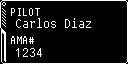
The startup screen is the image displayed briefly when powering on the device, while the firmware is initializing its main functions. By default, it shows the LineMaster 2.4GHz logo—but you can **easily customize it** with your club emblem, personal logo, name card with your AMA number, or any image you like.
The image must be:
* **Monochrome** (black and white)
* `.jpg` **format**
* Exactly **128 pixels wide by 64 pixels high**
LineMaster de 2.4 GHz logo
## How to Change the Startup Screen
{% stepper %}
{% step %}
### Power off the device and remove the battery
Turn off the handle. Unscrew the back cover to access the battery compartment. Remove the battery carefully and place it somewhere safe—avoid any risk of short circuits or damage.
{% endstep %}
{% step %}
### Remove the SD card
Use tweezers if needed to remove the SD card located above the battery compartment.\
*Take note of its orientation so you can reinsert it correctly later.*
{% embed url="" %}
{% endstep %}
{% step %}
### **Connect the SD card to your computer**
Use an SD adapter or built-in card reader to connect it.
{% endstep %}
{% step %}
### Get your custom image (splash)
You can download a **preset template** from our library.\
If you prefer to create your own, make sure it is:
* In **monochrome black and white**
* Saved as a **`.jpg`** file
* Exactly **128 × 64 pixels**
Once ready, **copy the image to the root** of the SD card and name it `splash.jpg`.\
If a file with that name already exists, overwrite it.
{% endstep %}
{% step %}
### Reinsert the SD card
Safely eject the SD card from your computer and insert it back into the device.
Press gently until it locks in place. Reinsert the battery, respecting the **indicated polarity**, and secure the cover with the screw.
{% hint style="danger" %}
Be sure to follow the battery polarity label. Incorrect polarity may permanently damage the device or cause a fire.
{% endhint %}
{% endstep %}
{% step %}
### Turn on the handle
If everything was done correctly, you’ll see your **custom image** when the handle powers up.\
If the default image still appears or the display looks distorted, the image may not meet the recommended specs in Step 4.
Double-check your process and try again. If the issue persists, feel free to **contact me directly—I’ll be happy to help.**
{% endstep %}
{% endstepper %}
## Our splash screens library
Here you'll find a small collection of ready-to-use startup images for your LineMaster 2.4GHz.\
You can download and test them right away, or use them as templates to create your own.
To download an image:
1. Right-click on it and select **“Save image as…”**
2. Save it under the name `splash.jpg`.
We’ll continue expanding this library with new designs—created by us or suggested by the community.\
If you have an image that might interest others, **don’t hesitate to share it!**